# Webhooks
> Get notified at your own URL when something happens with your orders, returns or supplier orders.
Every time an event you subscribed to happens, Melonn sends an HTTP `POST` to the URL you configured, with a JSON body that describes the event.
## Subscribe to an event
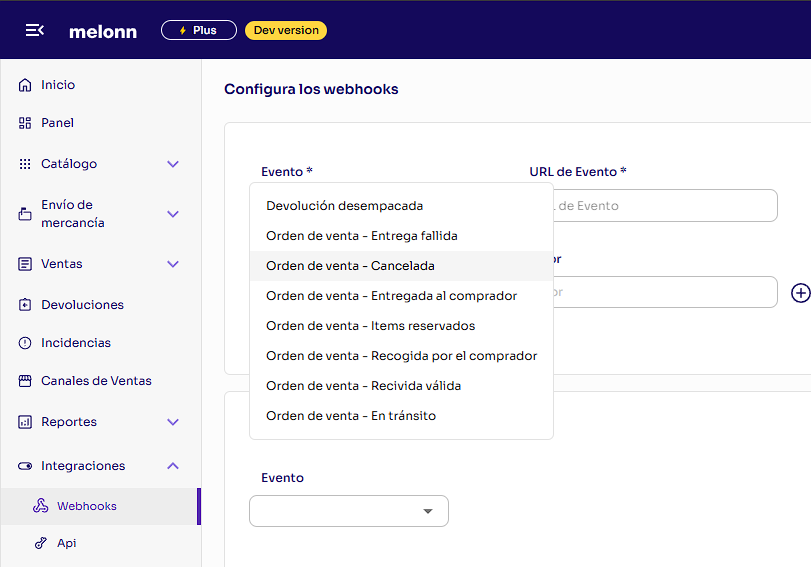
In [Orbita](https://admin.melonn.com), go to **Integrations** → **Webhooks**, pick the event and enter the URL that will receive it. You can also add headers, which Melonn sends with every call.
 Melonn does not sign webhook calls. Add a header with a secret value of your own when you configure the webhook, and reject calls that do not carry it.
## Test it
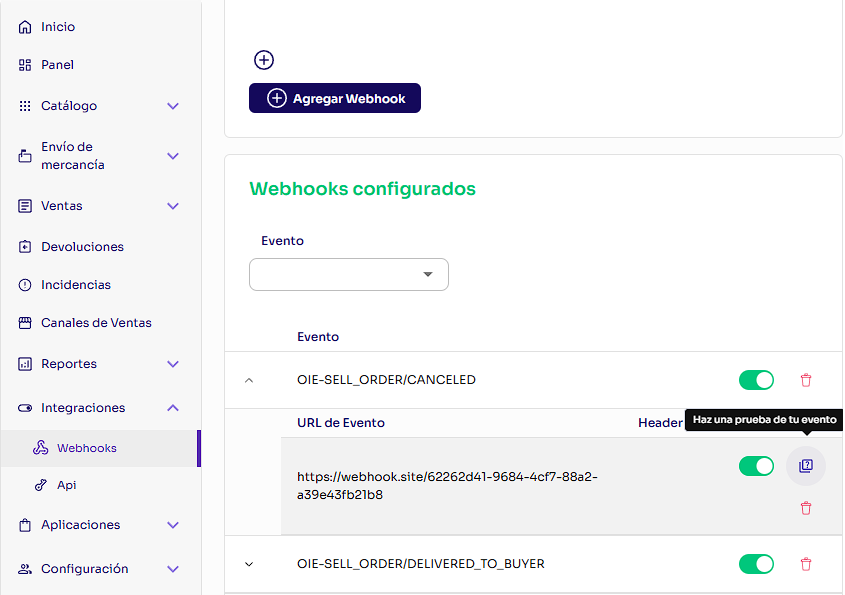
Once configured, send a test event from the list of configured webhooks. Melonn posts a sample payload to your URL and shows you the response.
Melonn does not sign webhook calls. Add a header with a secret value of your own when you configure the webhook, and reject calls that do not carry it.
## Test it
Once configured, send a test event from the list of configured webhooks. Melonn posts a sample payload to your URL and shows you the response.
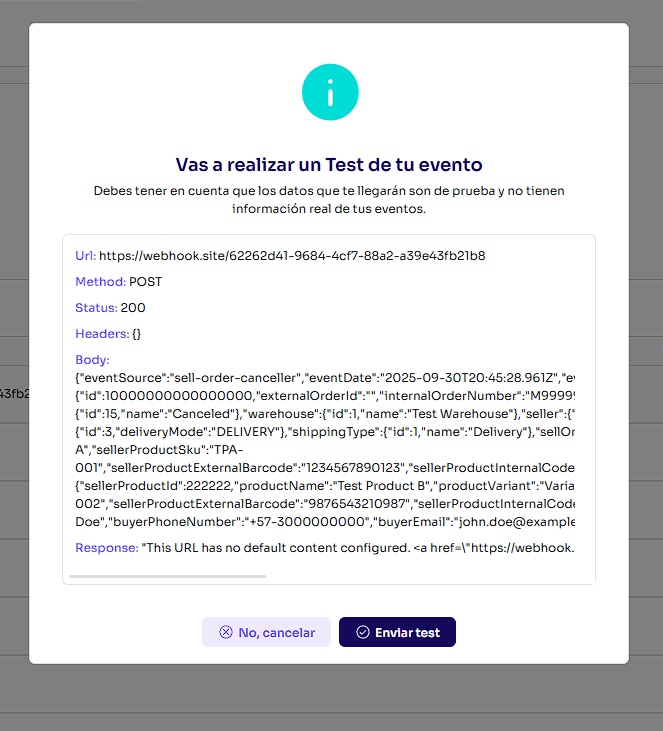 The test payload carries sample data, not information from your real orders. Build your integration against the examples in this reference.
## The payload
Every event has the same envelope. Most events also carry `eventSource` and `sourceSpecificEventIdentifier`; each event's page shows which fields it sends.
```json
{
"eventDate": "2025-10-01T16:30:00.000Z",
"eventClassifier": {
"category": "SELL_ORDER",
"type": "SELL_ORDER/PACKED"
},
"eventData": { }
}
```
- `eventClassifier.type` tells you which event it is. Route on it.
- `eventData` carries the entity the event is about. Each event's page documents its fields.
- **Fields without a value are left out**, not sent as `null`. Treat every field inside `eventData` as optional.
- New fields may be added to an event at any time. Ignore the ones you do not use.
## Delivery and retries
- Respond with any `2xx` status to acknowledge the event. Any other status, or a connection error, counts as a failure.
- Respond quickly, and do any slow processing after responding.
- A failed delivery is retried, **up to 3 attempts in total, about 5 minutes apart**.
- Events for the same URL are delivered **in order**. While an event is being retried, the events after it for that URL wait.
- After 3 failed attempts the webhook is **deactivated**, and it stops receiving events. Events that happen while it is inactive are not delivered later. Fix your endpoint and activate the webhook again in Orbita.
- An event can occasionally be delivered more than once. Make your processing idempotent: when the event carries `sourceSpecificEventIdentifier`, use it as the key, since it is unique for each occurrence; otherwise, key on the event type, the entity id and `eventDate`.
## Available events
| Event | Name in Orbita | Sent when |
| --- | --- | --- |
| [`SELL_ORDER/RECEIVED_VALID`](/api-reference/sell-order-events/sell-order-received) | Orden de venta - Recibida válida | A sell order passes validation and is accepted for fulfillment |
| [`SELL_ORDER/ITEMS_RESERVED`](/api-reference/sell-order-events/sell-order-items-reserved) | Orden de venta - Items reservados | All the items of a sell order have been reserved in the warehouse |
| [`SELL_ORDER/PACKED`](/api-reference/sell-order-events/sell-order-packed) | Orden de venta - Empacada | A sell order has been packed at the warehouse |
| [`SELL_ORDER/SHIPPED`](/api-reference/sell-order-events/sell-order-shipped) | Orden de venta - En tránsito | A sell order leaves the warehouse with the carrier and is in transit |
| [`SELL_ORDER/DELIVERED_TO_BUYER`](/api-reference/sell-order-events/sell-order-delivered) | Orden de venta - Entregada al comprador | A sell order is delivered to the buyer |
| [`SELL_ORDER/PICKED_UP_BY_BUYER`](/api-reference/sell-order-events/sell-order-picked-up) | Orden de venta - Recogida por el comprador | The buyer picks up a sell order at the pickup point |
| [`SELL_ORDER/CANCELED`](/api-reference/sell-order-events/sell-order-canceled) | Orden de venta - Cancelada | A sell order is canceled |
| [`SELL_ORDER/ALL_PACKAGES_SHIPPED`](/api-reference/sell-order-events/sell-order-fully-shipped) | Orden de venta - Despachada completa | Sent once per sell order, when the last of its packages leaves the warehouse |
| [`SELL_ORDER/PICKING_STARTED`](/api-reference/sell-order-events/sell-order-picking-started) | Orden de venta - Alistamiento iniciado | The warehouse starts picking the units of a sell order |
| [`SELL_ORDER/PACKING_STARTED`](/api-reference/sell-order-events/sell-order-packing-started) | Orden de venta - Empaque iniciado | The warehouse starts packing a B2B sell order. Picking and packing are separate steps: hours can pass between `SELL_ORDER/PICKING_STARTED` and this event |
| [`SELL_ORDER/MISSING_ITEM_REPORTED`](/api-reference/sell-order-events/sell-order-missing-item-reported) | Sell order - Missing item reported | Units of a sell order are reported missing at the warehouse while it is being picked |
| [`SELL_ORDER/MISSING_BIN_REPORTED`](/api-reference/sell-order-events/sell-order-missing-bin-reported) | Sell order - Missing bin reported | A bin (a case pack of your product) needed for a sell order is reported missing from its location. Each event reports one bin |
| [`SELL_ORDER_PICKING_GROUP/MISSING_ITEM_REPORTED_BY_SELLER`](/api-reference/sell-order-events/picking-group-missing-item-reported) | Picking group - Missing item reported, per seller | Units are reported missing while picking a picking group, a batch of orders that can belong to several sellers. You receive only your own items |
| [`STOCK_MGMT/STOCK_CONTROL_POINT_EXECUTED`](/api-reference/stock-events/stock-control-point-executed) | Stock control point - Executed | A stock control point (a check of the units at a location) is executed on your products, with the stock adjustments it made |
| [`STOCK_MGMT/MISSING_ITEMS_BY_SELLER`](/api-reference/stock-events/missing-stock-items-reported) | Missing stock items, per seller | Units of your products are reported missing during a stock count or a putaway. You receive only your own items |
| [`STOCK_MGMT/RECONCILED_ITEMS_BY_SELLER`](/api-reference/stock-events/stock-items-reconciled) | Reconciled stock items, per seller | A stock count reconciles the quantities of your products. You receive only your own items. Units found in excess are not included in this event yet |
| [`STOCK_MGMT/UNFULFILLABLE_REPORTED`](/api-reference/stock-events/unfulfillable-units-reported) | Unfulfillable - Reported | Units of your products are reported as unfulfillable and set aside. Large reports arrive in several events: `chunk.index` of `chunk.total`, and `unfulfillableReport.totalQty` is the total of the whole report, repeated in every chunk |
| [`STOCK_MGMT/UNFULFILLABLE_EXECUTED`](/api-reference/stock-events/unfulfillable-units-transferred) | Unfulfillable - Executed | Units reported as unfulfillable are transferred out of your available inventory. Large reports arrive in several events: `chunk.index` of `chunk.total` |
| [`STOCK_MGMT/UNFULFILLABLE_RELEASED`](/api-reference/stock-events/unfulfillable-units-released) | Unfulfillable - Released | Units previously reported as unfulfillable are released. Large reports arrive in several events: `chunk.index` of `chunk.total` |
| [`BUYER_RETURN_ORDER/CREATED`](/api-reference/return-order-events/return-order-created) | Devolución creada | A buyer return order is created |
| [`BUYER_RETURN_ORDER/ITSR_LABEL_GENERATED`](/api-reference/return-order-events/return-label-generated) | Devolución - Etiqueta de transporte generada | The transport label for a return managed by Melonn has been generated |
| [`BUYER_RETURN_ORDER/RECEIVED_AT_WAREHOUSE`](/api-reference/return-order-events/return-received-at-warehouse) | Devolución recibida en bodega | A buyer return order arrives at the warehouse |
| [`BUYER_RETURN_ORDER/UNPACKED`](/api-reference/return-order-events/return-unpacked) | Devolución desempacada | The items of a buyer return order have been unpacked at the warehouse |
| [`BUYER_RETURN_ORDER/CANCELED`](/api-reference/return-order-events/return-order-canceled) | Devolución - Cancelada | A buyer return order is canceled |
| [`SUPPLIER_ORDER/CREATED`](/api-reference/supplier-order-events/supplier-order-created) | Orden de ingreso creada | A supplier order is created |
| [`SUPPLIER_ORDER/CANCELLED`](/api-reference/supplier-order-events/supplier-order-canceled) | Orden de ingreso cancelada | A supplier order is canceled |
| [`SUPPLIER_ORDER/CLOSED`](/api-reference/supplier-order-events/supplier-order-closed) | Orden de ingreso cerrada | A supplier order is finalized: all its packages were processed, or it was finalized with differences, either through [Finalize supplier order](/api-reference/supplier-orders/finalize-supplier-order) or automatically |
| [`SUPPLIER_ORDER_PACKAGE/UNPACKED`](/api-reference/supplier-order-events/supplier-order-package-unpacked) | Supplier order package - Unpacked | A package of a supplier order has been unpacked at the warehouse |
The test payload carries sample data, not information from your real orders. Build your integration against the examples in this reference.
## The payload
Every event has the same envelope. Most events also carry `eventSource` and `sourceSpecificEventIdentifier`; each event's page shows which fields it sends.
```json
{
"eventDate": "2025-10-01T16:30:00.000Z",
"eventClassifier": {
"category": "SELL_ORDER",
"type": "SELL_ORDER/PACKED"
},
"eventData": { }
}
```
- `eventClassifier.type` tells you which event it is. Route on it.
- `eventData` carries the entity the event is about. Each event's page documents its fields.
- **Fields without a value are left out**, not sent as `null`. Treat every field inside `eventData` as optional.
- New fields may be added to an event at any time. Ignore the ones you do not use.
## Delivery and retries
- Respond with any `2xx` status to acknowledge the event. Any other status, or a connection error, counts as a failure.
- Respond quickly, and do any slow processing after responding.
- A failed delivery is retried, **up to 3 attempts in total, about 5 minutes apart**.
- Events for the same URL are delivered **in order**. While an event is being retried, the events after it for that URL wait.
- After 3 failed attempts the webhook is **deactivated**, and it stops receiving events. Events that happen while it is inactive are not delivered later. Fix your endpoint and activate the webhook again in Orbita.
- An event can occasionally be delivered more than once. Make your processing idempotent: when the event carries `sourceSpecificEventIdentifier`, use it as the key, since it is unique for each occurrence; otherwise, key on the event type, the entity id and `eventDate`.
## Available events
| Event | Name in Orbita | Sent when |
| --- | --- | --- |
| [`SELL_ORDER/RECEIVED_VALID`](/api-reference/sell-order-events/sell-order-received) | Orden de venta - Recibida válida | A sell order passes validation and is accepted for fulfillment |
| [`SELL_ORDER/ITEMS_RESERVED`](/api-reference/sell-order-events/sell-order-items-reserved) | Orden de venta - Items reservados | All the items of a sell order have been reserved in the warehouse |
| [`SELL_ORDER/PACKED`](/api-reference/sell-order-events/sell-order-packed) | Orden de venta - Empacada | A sell order has been packed at the warehouse |
| [`SELL_ORDER/SHIPPED`](/api-reference/sell-order-events/sell-order-shipped) | Orden de venta - En tránsito | A sell order leaves the warehouse with the carrier and is in transit |
| [`SELL_ORDER/DELIVERED_TO_BUYER`](/api-reference/sell-order-events/sell-order-delivered) | Orden de venta - Entregada al comprador | A sell order is delivered to the buyer |
| [`SELL_ORDER/PICKED_UP_BY_BUYER`](/api-reference/sell-order-events/sell-order-picked-up) | Orden de venta - Recogida por el comprador | The buyer picks up a sell order at the pickup point |
| [`SELL_ORDER/CANCELED`](/api-reference/sell-order-events/sell-order-canceled) | Orden de venta - Cancelada | A sell order is canceled |
| [`SELL_ORDER/ALL_PACKAGES_SHIPPED`](/api-reference/sell-order-events/sell-order-fully-shipped) | Orden de venta - Despachada completa | Sent once per sell order, when the last of its packages leaves the warehouse |
| [`SELL_ORDER/PICKING_STARTED`](/api-reference/sell-order-events/sell-order-picking-started) | Orden de venta - Alistamiento iniciado | The warehouse starts picking the units of a sell order |
| [`SELL_ORDER/PACKING_STARTED`](/api-reference/sell-order-events/sell-order-packing-started) | Orden de venta - Empaque iniciado | The warehouse starts packing a B2B sell order. Picking and packing are separate steps: hours can pass between `SELL_ORDER/PICKING_STARTED` and this event |
| [`SELL_ORDER/MISSING_ITEM_REPORTED`](/api-reference/sell-order-events/sell-order-missing-item-reported) | Sell order - Missing item reported | Units of a sell order are reported missing at the warehouse while it is being picked |
| [`SELL_ORDER/MISSING_BIN_REPORTED`](/api-reference/sell-order-events/sell-order-missing-bin-reported) | Sell order - Missing bin reported | A bin (a case pack of your product) needed for a sell order is reported missing from its location. Each event reports one bin |
| [`SELL_ORDER_PICKING_GROUP/MISSING_ITEM_REPORTED_BY_SELLER`](/api-reference/sell-order-events/picking-group-missing-item-reported) | Picking group - Missing item reported, per seller | Units are reported missing while picking a picking group, a batch of orders that can belong to several sellers. You receive only your own items |
| [`STOCK_MGMT/STOCK_CONTROL_POINT_EXECUTED`](/api-reference/stock-events/stock-control-point-executed) | Stock control point - Executed | A stock control point (a check of the units at a location) is executed on your products, with the stock adjustments it made |
| [`STOCK_MGMT/MISSING_ITEMS_BY_SELLER`](/api-reference/stock-events/missing-stock-items-reported) | Missing stock items, per seller | Units of your products are reported missing during a stock count or a putaway. You receive only your own items |
| [`STOCK_MGMT/RECONCILED_ITEMS_BY_SELLER`](/api-reference/stock-events/stock-items-reconciled) | Reconciled stock items, per seller | A stock count reconciles the quantities of your products. You receive only your own items. Units found in excess are not included in this event yet |
| [`STOCK_MGMT/UNFULFILLABLE_REPORTED`](/api-reference/stock-events/unfulfillable-units-reported) | Unfulfillable - Reported | Units of your products are reported as unfulfillable and set aside. Large reports arrive in several events: `chunk.index` of `chunk.total`, and `unfulfillableReport.totalQty` is the total of the whole report, repeated in every chunk |
| [`STOCK_MGMT/UNFULFILLABLE_EXECUTED`](/api-reference/stock-events/unfulfillable-units-transferred) | Unfulfillable - Executed | Units reported as unfulfillable are transferred out of your available inventory. Large reports arrive in several events: `chunk.index` of `chunk.total` |
| [`STOCK_MGMT/UNFULFILLABLE_RELEASED`](/api-reference/stock-events/unfulfillable-units-released) | Unfulfillable - Released | Units previously reported as unfulfillable are released. Large reports arrive in several events: `chunk.index` of `chunk.total` |
| [`BUYER_RETURN_ORDER/CREATED`](/api-reference/return-order-events/return-order-created) | Devolución creada | A buyer return order is created |
| [`BUYER_RETURN_ORDER/ITSR_LABEL_GENERATED`](/api-reference/return-order-events/return-label-generated) | Devolución - Etiqueta de transporte generada | The transport label for a return managed by Melonn has been generated |
| [`BUYER_RETURN_ORDER/RECEIVED_AT_WAREHOUSE`](/api-reference/return-order-events/return-received-at-warehouse) | Devolución recibida en bodega | A buyer return order arrives at the warehouse |
| [`BUYER_RETURN_ORDER/UNPACKED`](/api-reference/return-order-events/return-unpacked) | Devolución desempacada | The items of a buyer return order have been unpacked at the warehouse |
| [`BUYER_RETURN_ORDER/CANCELED`](/api-reference/return-order-events/return-order-canceled) | Devolución - Cancelada | A buyer return order is canceled |
| [`SUPPLIER_ORDER/CREATED`](/api-reference/supplier-order-events/supplier-order-created) | Orden de ingreso creada | A supplier order is created |
| [`SUPPLIER_ORDER/CANCELLED`](/api-reference/supplier-order-events/supplier-order-canceled) | Orden de ingreso cancelada | A supplier order is canceled |
| [`SUPPLIER_ORDER/CLOSED`](/api-reference/supplier-order-events/supplier-order-closed) | Orden de ingreso cerrada | A supplier order is finalized: all its packages were processed, or it was finalized with differences, either through [Finalize supplier order](/api-reference/supplier-orders/finalize-supplier-order) or automatically |
| [`SUPPLIER_ORDER_PACKAGE/UNPACKED`](/api-reference/supplier-order-events/supplier-order-package-unpacked) | Supplier order package - Unpacked | A package of a supplier order has been unpacked at the warehouse |